
Managing Pages
Last updated on by Freeola Support
1 out of 2 people found this article useful.
Important Information
This guide is for the Freeola InstantPro Website Builder. This service has now been replaced by a more modern product, RQS, and therefore is no longer updated with new features.
To build your website in RQS for free, please click here or visit the RQS Builder section of your MyFreeola Control Panel.
The following guide includes two sections, the first on Publishing/Unpublishing Pages (making them live or offline) and the second on Managing Page Names.
You can choose to publish or unpublish (take offline) any of your pages at any time. If you need to take a page offline temporarily or are currently working on a page, you can stop anyone from being able to access it (including search engines).
Step 1
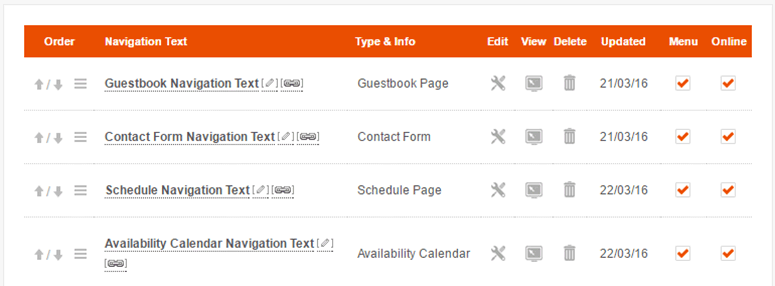
From the Main Menu, select Page Manager from under the Pages & Content heading. This will take you to a list of all the pages on your website.
Step 2
There are tick boxes under the Online column, you can check or uncheck the box so that the page will appear either on or offline. There is also a Menu tick box, which controls whether or not your page is displayed on your Navigation Menu.
Once you have made your selection, press the Finish button.
When you create a page you will be asked to enter your Navigation Text (page name). The text that you enter here will appear on your Navigation Menu and will be the resulting URL (web page address).
Unless you are worried about Search Engine Optimisation you don't really need to pay much attention to what the resulting web address is.
In cases where you don't want the URL to be the same as what appears on your navigation button, you can change it by taking the following steps:
Step 1
From the Main Menu, select Page Manager from under the Pages & Content heading. This will take you to a list of all the pages on your website.
Step 2
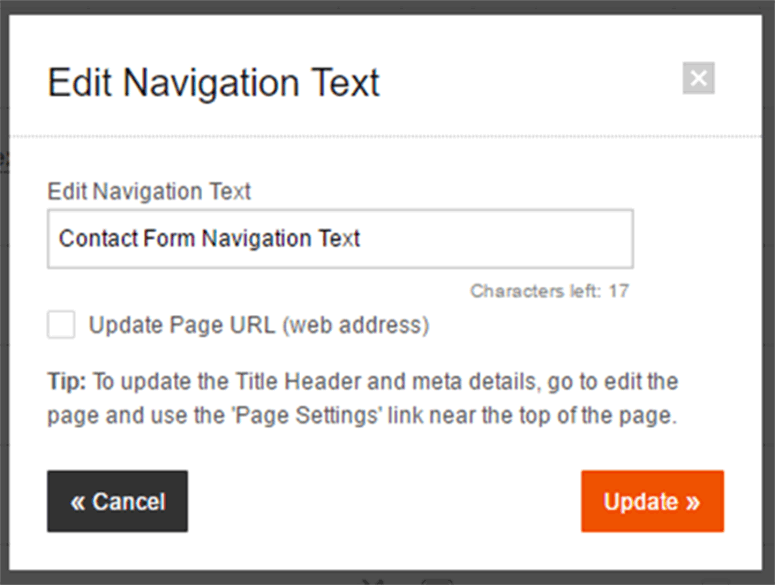
Click the Pencil Icon next to the page that you want to change. The Edit Navigation Text box will appear from which you will be given the chance to change the text, and select whether you want this to update the URL by using the tick box.
Live Chat is offline
Live Chat is available:
9:30am to 5:30pm Monday to Friday (excluding bank holidays).
It appears you are using an old browser, as such, some parts of the Freeola and Getdotted site will not work as intended. Using the latest version of your browser, or another browser such as Google Chrome, Mozilla Firefox, Edge, or Opera will provide a better, safer browsing experience for you.