
Adding a Custom Domain to Mobile Me
Last updated on by Freeola Support
2 out of 2 people found this article useful.
Please Note
MobileMe was a service offered for sale by Apple until 2011, before being completely ceased in 2012.
As such, the instructions within this guide are no longer relevant. However, this guide will remain for reference purposes.
Should you wish to host your website for use with your GetDotted domain name, we would recommend using any Freeola Hosting Service as an alternative.
Welcome to the Freeola Internet customer support pages. This is an article to help you point your domain name at your MobileMe hosting account. For more internet help topics please visit our main Support Page.
Apple provide Mobile Me accounts so that you can sync your iPhone, Mac and PCs. Part of the service they provide is a way in which to host websites made with iWeb (web publishing suite for Mac). If you have a domain name with Freeola that you wish to point towards your MobileMe website hosting with iWeb '08 or '09 then this guide will help you achieve that.
Open iWeb
Make sure you are connected to the Internet
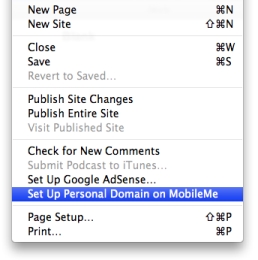
Go to File and then Set Up Personal Domain on MobileMe.
![]()
Log into your MobileMe account.
Click the Add Domain... button.
Enter and confirm your domain name in the appropriate fields and click Continue.
Now open another web browser, such as Safari, and log into your MyFreeola account.
Expand the DNS Records section of the left hand menu, then click DNS Settings.
Tick the box next to the domain you wish to point at your MobileMe site and click Change DNS.
Select Create/Modify Custom Web DNS Records (Advanced) and click Next.
Click Next again. The following page will allow you to add your record. Select CNAME from the drop-down list then Add+.
![MyFreeola Adding CNAME]()
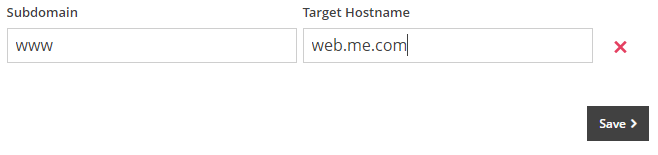
Within the Subdomain field enter www then set the Target Hostname as web.me.com. Once entered, click Save.
![MobileMe CNAME Record]()
Any DNS change can take up to 24 hours to fully propagate, however these records are normally in place within an hour or two.
Once you have added the record via MyFreeola, return to the MobileMe site and click Done. Your domain will now point towards your MobileMe hosting account and the site held within.

Live Chat is offline
Live Chat is available:
9:30am to 5:30pm Monday to Friday (excluding bank holidays).
It appears you are using an old browser, as such, some parts of the Freeola and Getdotted site will not work as intended. Using the latest version of your browser, or another browser such as Google Chrome, Mozilla Firefox, Edge, or Opera will provide a better, safer browsing experience for you.