
How to set-up email forwarding
Last updated on by Freeola Support
4 out of 12 people found this article useful.
Welcome to the Freeola Internet customer support pages. This guide is designed to help with forwarding a Freeola e-mail address. For more internet help topics please visit our main Support Page.
Sometimes it's handy to temporarily automatically forward e-mail from one account to another and Freeola offers this FREE service even if the address you're diverting to is not hosted at Freeola.
The following instructions assume that you have already created an e-mail address within your MyFreeola account. If you have not done this and would like a guide for creating an address please click here.
Enter your MyFreeola account.
From the left-hand navigation menu click My Email Addresses from under the Email Settings header.

Here will display a list of the e-mail addresses currently created on your account, next to the relevant e-mail address you should select the option that reads Settings & Features.
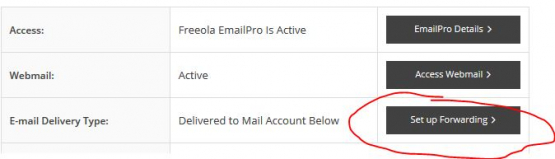
This new page will give the current status of your e-mail address, click the button that says Set up Forwarding.
(If forwarding is already in place on this address, this option will read Change Forwarding).
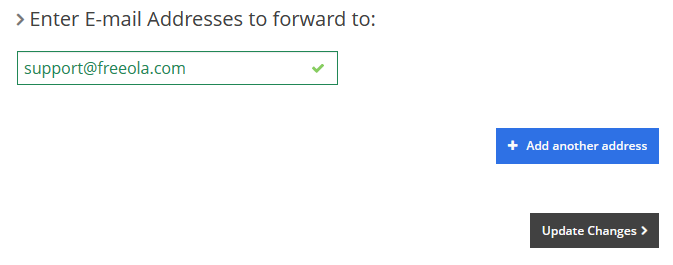
Within the relevant box, type in the address you wish to forward e-mails to and click Continue.
![Email Forwarding Setup]()
A verification e-mail will be sent to this given forwarding address to ensure that this is an active address.
Once confirmed all e-mail to this address will go to the e-mail address(es) you have just entered.
![Email Forwarding Verified]()
If you would like to cancel e-mail forwarding at any time, simply follow steps 1 to 3 and click Cancel Forwarding (or Cancel All Forwarding) and then click OK to confirm.


Please Note
Some free e-mail providers, such as Hotmail, Gmail or Yahoo, will periodically block, or restrict, forwarded messages due, in part, to the automatic nature with which they are sent.
Freeola Support always advise accessing e-mail directly using webmail or an e-mail client for the best possible e-mail service.
Live Chat is offline
Live Chat is available:
9:30am to 5:30pm Monday to Friday (excluding bank holidays).
It appears you are using an old browser, as such, some parts of the Freeola and Getdotted site will not work as intended. Using the latest version of your browser, or another browser such as Google Chrome, Mozilla Firefox, Edge, or Opera will provide a better, safer browsing experience for you.