
Philips / SMC SNA6500 Router Setup Guide
Last updated on by Freeola Support
2 out of 2 people found this article useful.
Welcome to the Freeola Internet customer support pages. This guide is designed to help with setting up your Philips / SMC SNA-6500 Router to work with Freeola Broadband. For more internet help topics please visit our main Support Page.
These instructions apply to the Philips / SMC SNA-6500 ADSL Modem Router. The settings may also apply to other Philips / SMC routers.
Your new router needs to be configured with a few details before it can work with Freeola Broadband. The router needs to be configured via a web browser such as Firefox, Google Chrome or Microsoft Edge.
Connect your router to the telephone line using the leads and microfilters supplied.
Now connect the router to at least one computer via an ethernet cable (we do not recommend using the USB option). The network connection on the computer should be set to automatically look up an IP Address via DHCP (don't worry - if you're using a modern version of Windows and you've never used your network connection before, it's most likely already set up to do this).
On the computer connected to the router, load your internet web browser and visit the following internet address: http://192.168.2.1. This should open the Philips software within the router, by default this requires no password to access.
Within your web browser you should see a screen that has 1 Getting Started as its heading. On this page please click on the Next button on the right hand side of the page.
A new page showing the text 2 Wireless Settings should now be visible, there should be no need to change any settings on this page as the default settings should be fine for the majority of customers.
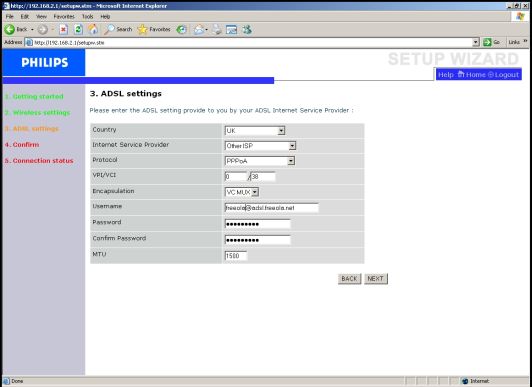
Again please click on the Next button on the right hand side of the page to continue.On the next page, the screen should read 3 ADSL Settings. Select UK as the country then select Other ISP as the Internet Service Provider.

The screen should reload and present you with a new screen with a prompt to supply the user name. Enter the Freeola username for your Broadband, provided in your broadband welcome pack, in the format [email protected], [email protected] or [email protected]. This will also have been sent to you via e-mail in the time before your activation.
If you are unable to find either of these you can access this information by selecting Broadband Details and Usage from within your MyFreeola Control Panel.Enter the Freeola supplied password in both the Password and Confirm Password fields.
Select Save Settings at the bottom of the page to save all changes made.
The router will now restart itself.
Please be patient as this can take a minute or two.The router should display a confirmation message informing you that the router has been set up successfully and is now connected to the internet.
Finally select ADSL/Internet settings from the menu on the left-hand side and then select ISP settings.
Under the Connect Type option select Always Connected and then select Save Settings.
Your router should now be successfully setup and ready to use.
Live Chat is offline
Live Chat is available:
9:30am to 5:30pm Monday to Friday (excluding bank holidays).
It appears you are using an old browser, as such, some parts of the Freeola and Getdotted site will not work as intended. Using the latest version of your browser, or another browser such as Google Chrome, Mozilla Firefox, Edge, or Opera will provide a better, safer browsing experience for you.