
BT iPlate Information
Last updated on by Freeola Support
The Interstitial Plate (iPlate) is a device that can be used on ADSL connection lines in order to improve broadband stability and internet speed. The device is attached to the master phone socket (this is usually the socket closest to the front-door of your home), filtering what is known as the "bell wire" from the wiring loop. Filtering the bell wire can reduce noise and interference on the line.
As ADSL lines are being phased out, the need for such a device is becoming less and less as more people upgrade their faceplates and migrate to VDSL and FTTP services.
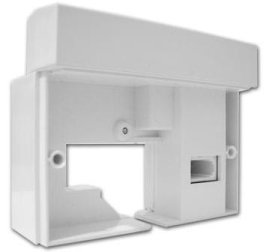
ADSL noise and interference are increased by a collection of factors, which ultimately reduces bit rate (speed) and can cause problems with line-stability. The more interference that occurs, the less stable the line. One possible factor behind this is the bell (or 'ring') wire.
This wire was originally used in sockets to make old-style analogue telephones ring, which have mainly become obsolete with today's technology. Therefore, the wire's presence in the master socket serves only to cause interference on your connection.
The major attributes of the iPlate are that it helps towards improving stability and increasing internet speed. There are various claims as to how effective the equipment is, but some users have experienced a significant increase in their connection speed.
A benchmark survey was performed on the iPlate on 36,000 filtered lines, showing more realistic speed increases of 1.5Mb on average. This indicates a good chance of line improvement in most cases. The results also showed performance benefits on lines where there was no real speed increase, as the survey showed the lines had 20% fewer lost connections (re-trains) and a 45% reduced error rate.
Previous estimates showed that 7 out of 10 UK-based homes will see improvement of some degree. At the time of initial publication, this means that over 9 million broadband lines could benefit from this one piece of equipment! So purchasing could be a great idea for your home.
However there are some things to consider when deciding whether to use an iPlate or not. The iPlate will have little or no effect in the following circumstances:
In premises where there is already a Service Specific Front Plate (SSFP) in place, or any equipment that will separate the broadband and telephone signals
In most cases where the socket is newly installed (generally having the BT Openreach Logo)
In cases where the line itself is newly installed, which will mean there will be no bell wire.
You will also need to assure that you have a specific type of master socket, as the BT iPlate is only designed for use with the NTE5 faceplate model. You can quickly check to see if you have one by comparing your socket to the picture of the NTE5 faceplate, below.
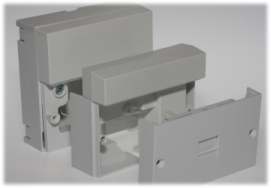
The BT i-Plate is incredibly easy to install, and near enough anyone can do it themselves. It requires no technical or engineering experience, and the only tool you will need is a screwdriver.
As the picture of the NTE5 faceplate shows, there are two screws either side of the bottom section. Simply remove these screws, allowing you to lift the front of the socket off. This will display the internal part of the socket, which will have a "test" socket to the right hand side. Simply slide the i-Plate into position and slot it into this "test" socket, and then replace the lower section of the faceplate over the newly fitted iPlate.
Live Chat is offline
Live Chat is available:
9:30am to 5:30pm Monday to Friday (excluding bank holidays).
It appears you are using an old browser, as such, some parts of the Freeola and Getdotted site will not work as intended. Using the latest version of your browser, or another browser such as Google Chrome, Mozilla Firefox, Edge, or Opera will provide a better, safer browsing experience for you.